
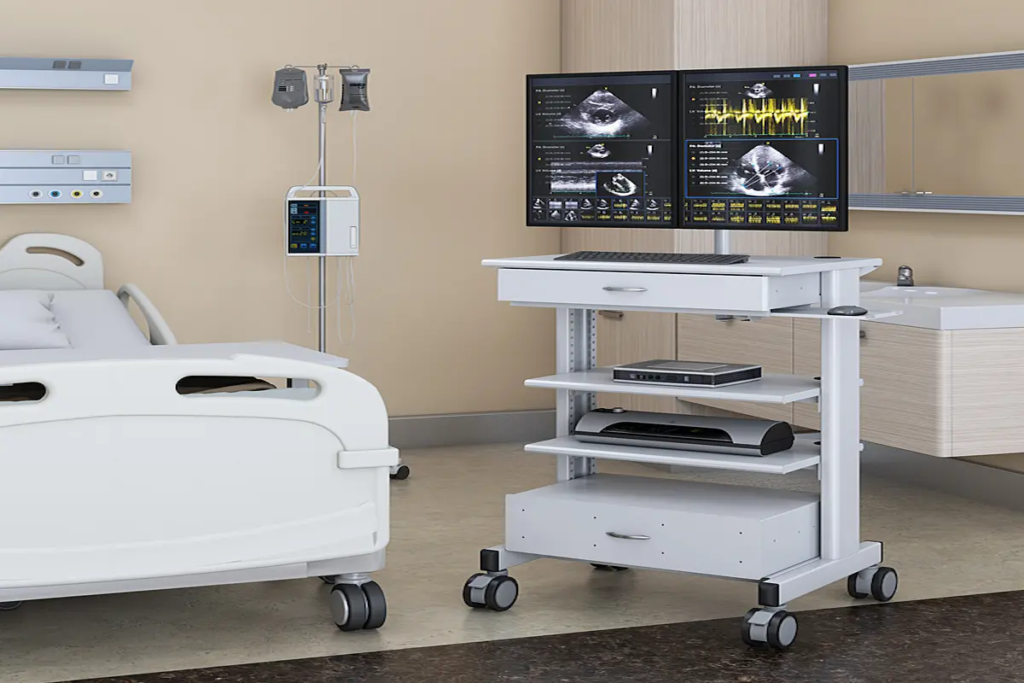
Clinic Rolling Computer Carts: The Documentation Efficiency and Dual-Monitor Guide for Clinical Teams
|
⚡ Quick Summary • A clinic rolling computer cart is a mobile clinical workstation designed to travel with the clinician rather than anchoring documentation to a fixed point in the room. The efficiency gain is not about the technology on the cart — it’s about where documentation happens relative to where care happens. • Dual monitor configurations are not a luxury for healthcare workflows. Any clinical role that uses two or more systems simultaneously — EMR plus imaging, medication record plus barcode scan feed, video consultation plus documentation — loses measurable time and introduces error risk on a single screen. • Different clinic types have fundamentally different cart requirements. A GP exam room cart, a community nursing cart, and an ED bay cart all have different footprint, adjustability, durability, and power requirements that a single product description doesn’t address. • Ergonomic specification for clinical rolling carts has six specific dimensions beyond standard office ergonomics: height range, monitor mount height relative to work surface, keyboard position, dual monitor geometry, handle ergonomics, and brake engagement mechanism. • AFC Industries PA supplies clinic rolling computer carts with single and dual monitor configurations for healthcare environments across Pennsylvania and the Mid-Atlantic. Use the product configurator or contact the team to spec a cart for your clinical environment. |
What Is a Clinic Rolling Computer Cart and What Problem Does It Actually Solve?
The documentation problem in clinic environments is not a software problem. It’s a location problem. Clinical systems are frequently excellent; the issue is that the computer is somewhere other than where the care is happening, which means the documentation happens somewhere other than where the information was gathered.
A nurse who takes a patient’s blood pressure at the bedside, walks to a fixed workstation to record it, and walks back to the patient to continue has performed a task that should take 90 seconds in two minutes and forty seconds, with an interruption to patient interaction in the middle. Multiply that pattern across twelve patients and six vital signs checks per patient in a shift, and the accumulated time and interruption load is significant.
Research published in the American Journal of Nursing found that nurses spent an average of 35% of their documentation time walking to and from fixed workstations. That’s not a failure of clinical intent — it’s a workstation design failure. A clinic rolling computer cart doesn’t improve documentation compliance by reminding clinicians to document. It improves it by removing the journey that makes documentation an interruption.
This blog covers a different dimension from our hygiene cart guide, which focuses on surface material specification and infection control protocols for carts in high-disinfection environments. Here the focus is the productivity, dual-monitor workflow, and ergonomic specification that determines whether a rolling cart makes clinical work faster and less physically demanding — or just moves the same workstation problems on wheels.
AFC Industries PA is a Pennsylvania-based workspace solutions specialist, independent from AFC Industries. We supply clinic rolling computer carts to GP clinics, outpatient centres, community health services, and hospital departments across the Mid-Atlantic region.
Why Do Dual Monitor Computer Carts Improve Clinical Workflow Efficiency?
The answer is not that two screens are better than one in some general sense. It’s that specific clinical workflows create a context-switching cost on a single screen that accumulates into errors and time loss at a scale most facilities don’t track as a workstation problem.
Context switching — the cognitive cost of moving between tasks when switching applications interrupts the current mental state — has been documented in clinical environments as a contributing factor in documentation errors. A 2013 study in the Journal of the American Medical Informatics Association found that interruptions during clinical documentation were associated with a 12.7% increase in documentation error rate. Application switching on a single screen is a systematic, predictable interruption that happens every time two systems are both needed simultaneously.
A dual monitor cart doesn’t eliminate all interruptions. It eliminates the application-switching interruption by keeping both systems simultaneously visible. The patient record stays open. The imaging viewer stays open. The medication administration record stays visible during the barcode scan. The table below maps the six most common dual-screen clinical configurations to the specific workflows and clinical environments where that configuration delivers the clearest benefit.
|
Dual-Screen Configuration |
Primary / Secondary Screen Use |
Best Clinical Context |
Productivity Rationale |
|
EMR + Imaging Review |
Primary: EMR record open; Secondary: radiology or lab image viewer |
Physician rounds, urgent care, diagnostics |
Eliminates toggling between applications that causes context-switching errors during clinical review |
|
Scheduling + Patient Record |
Primary: patient chart; Secondary: booking and appointment system |
Outpatient clinics, GP surgeries, admin-heavy roles |
Scheduling while reviewing history reduces the phone-hold pattern where the patient waits while the clinician navigates single-window |
|
Medication + Verification |
Primary: medication administration record; Secondary: barcode scan feed |
Pharmacy dispensing, medication rounds, ICU |
Dual-screen verification workflow reduces wrong-drug and wrong-dose events by keeping the MAR visible during the scan step |
|
Telehealth + Documentation |
Primary: video call; Secondary: EMR documentation during call |
Telehealth, remote consult, community care |
Documenting on the primary screen during a video call makes the patient visible as a small window — dual screen keeps both full-size |
|
Triage + Reference |
Primary: triage assessment form; Secondary: clinical reference tool |
ED triage, urgent care, community nursing |
Reference without losing the assessment form prevents the documentation restart that happens when a single-screen clinician navigates away |
|
Training + Supervision |
Primary: trainee’s EMR session; Secondary: supervisor oversight screen |
Clinical training, ward rounds, simulation |
Supervisor sees the trainee workflow without leaning over — reduces the physical proximity that creates contamination risk in clinical training |
How Should Dual Monitors Be Positioned on a Rolling Cart?
The geometry of a dual monitor setup on a rolling cart matters more than most buyers realise, because the compact footprint of a cart constrains the options in ways that a fixed desk dual-monitor arm does not.
The primary screen — the one used for active documentation or the EMR — should sit directly ahead of the operator at the correct eye height. The secondary screen should be within 30 degrees of horizontal rotation from the primary. Beyond 30 degrees, the clinician sustains a rotation posture rather than a glance, which creates the same cumulative neck injury risk as a badly positioned single screen. Many dual-arm cart configurations fan out the two screens to look impressive but position them at 60–90 degrees of separation — which is ergonomically worse than a single screen for any workflow that requires both screens simultaneously.
The arms also need to be individually adjustable in tilt and height. A dual monitor arm that moves both screens together cannot be used to place the primary at documentation height and the secondary at reference height — and that configuration, where one screen is slightly lower and the other at eye level, is appropriate for the majority of combined documentation and monitoring workflows.
AFC Industries PA integrates ergonomic mount systems into clinic rolling cart configurations with dual-arm specifications engineered for clinical workflow geometry rather than aesthetic symmetry.
How Do Rolling Cart Requirements Differ Across Clinic Types?
The phrase “clinic rolling computer cart” covers a product range that includes everything from a lightweight single-screen pole cart used by a community nurse visiting home patients to a dual-screen workstation-on-wheels used by a physician doing ward rounds in an acute hospital. Treating those as the same specification requirement produces a cart that’s too heavy for one environment and too basic for the other. The table below maps six clinic types to their specific rolling cart requirements and the operational reason each specification matters.
|
Clinic Type |
Primary Screen Use |
Key Cart Specification |
Operational Reason |
|
General Practice / GP Clinic |
Single or dual screen, exam room documentation |
Compact footprint — exam rooms are small; height-adjustable for seated/standing documentation; lockable wheels for stability during typing |
GP workflow shifts between patient-facing consultation and screen-facing documentation multiple times per appointment |
|
Outpatient / Day Surgery |
Dual screen, patient intake to discharge |
Wider surface for forms and tablet alongside computer; storage for intake documents; height adjustment for standing intake staff |
Patient intake volume means the cart sees heavy use across many users — durability and fast adjustment cycle matter more than in low-volume settings |
|
Emergency Department |
Single rugged cart per bay, fast access |
Compact, low-profile to avoid obstruction; fast-lock casters for rapid repositioning; no loose accessories that become projectiles |
ED environments have fast-moving staff and equipment — carts that project into corridors or have protruding components are safety hazards |
|
Community / District Nursing |
Single screen, lightweight, vehicle-storable |
Lightweight frame for lone-worker portability; battery-backed system; durable case for transport in vehicle between visits |
Community nursing carts often travel in staff vehicles between home visits — transport durability and battery life are the primary specifications |
|
Rehabilitation / Physio |
Single screen, wide base, height-critical |
Extra-wide base for stability during patient exercises nearby; height adjust critical for standing and kneeling documentation positions |
Physio documentation often happens in non-standard postures relative to a patient on a plinth — the cart must accommodate the clinician’s variable position |
|
Telehealth / Virtual Clinic |
Dual screen, camera-integrated configuration |
Stable base for video equipment; cable management for camera, mic, and computer; adjustable monitor height for camera eye-line alignment |
Virtual clinic environments are patient-facing — the professional setup of the cart background is part of the clinical impression |
What Is the Difference Between a Clinic Rolling Cart and a Hospital Medical Cart?
The distinction matters for procurement purposes. A hospital medical cart is built for acute clinical environments: higher disinfection frequency, heavier equipment payloads, more complex access control requirements, and the durability demands of 24/7 use in a high-traffic environment. For the surface material and infection control specification of that product category, our hygiene cart guide covers the detail.
A clinic rolling computer cart is built for the workflow demands of outpatient, primary care, and community health environments: lighter payloads, more emphasis on quick adjustment for multiple users, more varied room configurations, and in community settings, transport durability for carts that travel in vehicles between patient visits.
The overlap exists in larger outpatient settings and specialist clinics that share some characteristics of both categories. For those environments, the right specification starts from the workflow and the disinfection protocol simultaneously, rather than from a product category label.
What Ergonomic Specifications Actually Matter on a Rolling Clinical Cart?
Standard ergonomic guidance for workstations — screen at eye level, elbows at 90 degrees, wrists neutral — applies to rolling clinical carts but doesn’t account for several dimensions that are specific to the clinical rolling context. The table below covers six ergonomic dimensions with the clinical-specific standard for each and what goes wrong without it.
|
Ergonomic Dimension |
Clinical Standard |
What Goes Wrong Without It |
|
Height Adjustment Range |
Seated documentation height: 65–75cm. Standing: 95–115cm. Full range needs to cover both without separate mechanisms. |
Most standard carts don’t reach the low end of seated height without a footrest. Check adjustment range against your shortest sitting-height user. |
|
Monitor Mount Height |
Screen top edge at or just below seated eye level — approximately 120–135cm from floor for a 170cm user seated. |
A monitor mounted too high relative to the height-adjusted surface forces the neck into extension during documentation — the most common injury source. |
|
Keyboard Position |
At elbow height for the current work surface position; wrists neutral; forearms roughly level. |
On a rolling cart the keyboard often gets placed on the work surface rather than a tray — which puts it too high for most users. A keyboard tray changes this. |
|
Dual Monitor Geometry |
Primary screen directly ahead; secondary at no more than 30° horizontal rotation from primary. |
Beyond 30°, the operator sustains rotation rather than glancing. Dual mounts that fan out wide are ergonomically worse than a single screen for most workflows. |
|
Handle Ergonomics |
Handle height allows straight-arm push without shoulder elevation; ideally adjustable to match work surface height. |
Handles fixed below waist height force the operator to flex forward to push — increasing injury risk in gowning and generating more floor-level movement. |
|
Brake Engagement |
Foot-operated or hands-free brake preferred; avoid designs requiring squat or bend to lock. |
Clinicians locking a cart brake multiple times per hour should not need to bend down to do it. Foot-operated brakes are faster and reduce cumulative bending load. |
How Does Ergonomic Cart Design Reduce Clinical Staff Fatigue?
Musculoskeletal disorders are the most common occupational injury category for nursing staff in the US, and the Bureau of Labor Statistics data is consistent: healthcare workers have higher rates of work-related MSK injury than construction workers in several subcategories. A significant proportion are caused by repeated awkward postures during documentation — bending over a cart that’s at the wrong height, reaching for a screen that’s too far forward, or twisting to access a device mounted for a different user’s dominant hand.
The practical implication is not that clinicians need to be reminded to maintain good posture. It’s that the equipment needs to support good posture without requiring the clinician to consciously adopt it. A cart at the wrong height produces bad posture automatically, regardless of how ergonomically aware the user is. A cart at the right height produces acceptable posture by default.
AFC Industries PA’s medical carts and computer carts are specified with height adjustment mechanisms that cover the clinical staff height range, not a generic office ergonomic range that undershoots the low end of seated clinical documentation height.
Do Clinic Rolling Carts Need Integrated Power or Battery Systems?
This question gets answered more often by default than by specification, and the default is usually wrong. Standard rolling carts without integrated power need to be plugged into a wall socket at every documentation point. In a room with one socket, positioned behind the examination couch, that means either a trailing lead across the floor (a trip hazard and a contamination risk) or repositioning the cart to reach the socket (defeating the point of mobility).
Integrated battery or UPS systems eliminate the trailing lead problem and allow the cart to operate away from wall power for the duration of a documentation task. The specification question is the battery size relative to the equipment load. A 150Wh battery running a computer, a monitor, and a barcode scanner might last four to six hours of active use — adequate for ward rounds or clinic sessions. Dual monitor setups with a full computer draw significantly more power and need a larger battery to cover the same session length.
Hot-swap battery systems — where a depleted battery can be replaced without shutting down the connected equipment — are the correct specification for carts that need to operate continuously across full shifts without equipment restarts. Single-battery systems that require a shutdown for replacement create documentation interruptions every time the battery is changed.
AFC Industries PA integrates battery and UPS options into clinic rolling cart builds. For environments requiring continuous power across shift changes, the custom products programme covers hot-swap battery system integration with documented power specifications for the connected equipment load.
How Do You Choose the Right Clinic Rolling Computer Cart?
The most useful starting point is not the product catalogue. It’s a workflow observation session: watch how staff in the target department currently use their workstations for one full shift, note every time they walk to a fixed station when the information was available at the point of care, and document the room dimensions and power access positions. That observation produces a specific requirement rather than a generic one.
Six questions translate that observation into a cart specification:
|
# |
Question to Answer Before Ordering |
What It Prevents |
|
1 |
How many screens, and will operators ever need two applications open simultaneously? |
If the answer to the second question is yes for any role in the department, a single-screen cart creates a workflow problem that screen-switching cannot fully solve. |
|
2 |
What is the room layout — aisle width, door clearance, exam room size? |
A cart that fits in the corridor doesn’t automatically fit through a standard exam room door with a dual monitor arm extended. Measure door clearances with the cart in its transit configuration. |
|
3 |
How many different staff will use this cart across a shift cycle? |
A cart shared between one physician and one nurse in a single room has different adjustment requirements from a cart shared between eight staff across three departments. Adjustment speed and memory presets matter at scale. |
|
4 |
Does the cart need an integrated power solution — UPS or battery system? |
Carts that operate away from wall power for extended periods need an integrated battery or UPS. Size the battery to the equipment load, not to a generic ‘standard’ option that may not run the full shift. |
|
5 |
What is the floor surface — carpet, vinyl, polished concrete, or raised access? |
Wrong caster compound for the floor creates rolling resistance that makes the cart feel dangerous, or marks the floor, or both. Hard casters on hard floors; soft casters on carpet. |
|
6 |
Will this cart need to meet infection control documentation requirements? |
If the answer is yes, material certifications and surface disinfectant compatibility records must be requested at the time of order. This is covered in detail in our hygiene cart guide for facilities with stringent surface spec requirements. |
How Do Clinic Rolling Carts Improve Efficiency and ROI?
The 35% documentation time reduction figure from the American Journal of Nursing research represents the efficiency ceiling of rolling cart deployment in nursing environments. In practice, the gain varies by department, patient mix, and how much of the documentation was previously happening at fixed stations rather than at the point of care. Acute wards with high patient turnover and complex documentation requirements see the largest gains. Low-volume specialist clinics with simple documentation workflows see smaller ones.
The ROI case has a secondary component that’s harder to quantify but consistently reported: end-of-shift fatigue reduction. Nurses who document at the point of care rather than walking repeatedly to fixed stations report lower physical fatigue at end of shift in qualitative studies, which correlates with lower error rates in the final hours of a shift and better handover quality. Neither of those outcomes appears in a simple efficiency calculation, but both affect patient safety outcomes that carry significant institutional cost.
What Do Clinic Rolling Computer Carts Cost?
Pricing varies by screen count, height adjustment mechanism, power integration, and whether specialist clinical or community portability requirements apply:
- Single-screen clinic rolling cart (manual height adjust, standard cable management, office-grade casters): $600–$1,800. Suitable for low-volume clinical environments with standard power access.
- Single-screen clinic rolling cart (electric height adjust, foot-operated brake, sealed cable management): $1,500–$3,000. Better suited to multi-user clinical environments where adjustment speed matters.
- Dual monitor clinic rolling cart (independently adjustable arms, electric height adjust, cable management for two monitors): $2,500–$5,500. Required for any workflow where two systems need to be simultaneously visible.
- Community nursing cart (lightweight, vehicle-storable, battery-backed): $1,200–$3,500 depending on battery capacity and transport case specification.
- Full clinical rolling workstation (dual monitor, hot-swap battery, medication storage, height-adjustable, ergonomic mount): $4,500–$9,000+ for a fully specified point-of-care workstation. This product overlaps with the hygiene cart category — surface specification should be confirmed to the disinfection protocol of the target department.
For multi-cart procurement across a clinic or department, volume pricing through AFC Industries PA consistently reduces per-unit cost and includes compatibility consultation to ensure all carts in a fleet share consistent adjustment ranges and accessories — which matters for staff who move between carts across shifts.
Conclusion: The Rolling Cart’s Value Is in Where It Puts the Clinician, Not What It Carries
The clinical benefit of a rolling computer cart is not the technology it holds. Every clinic already has computers. It’s where the documentation happens — whether at the point of care alongside the patient, or at a fixed station that requires the clinician to leave and return. That difference determines whether the cart improves documentation accuracy and completeness, reduces staff walking distance and fatigue, and supports the kind of patient interaction that builds trust and satisfaction.
Getting the specification right means matching the cart to the workflow of the actual department — not specifying a hospital acute cart for a GP surgery, not specifying an office-grade pole stand for a community nurse who puts it in a van. Single or dual screen, height range, power system, floor surface, room dimensions, and the number of staff sharing the cart are all specification inputs, not afterthoughts.
AFC Industries PA is a Pennsylvania-based workspace solutions specialist, independent from AFC Industries. We supply clinic rolling computer carts and dual monitor clinical workstations to GP clinics, outpatient centres, community health services, and hospital departments across Pennsylvania and the Mid-Atlantic region. For environments with stringent surface spec requirements, see our hygiene cart guide. Explore medical carts, computer carts, and custom OEM builds, use the product configurator to spec a setup, browse the full shop, or contact the team to discuss your clinic type and workflow requirements. More about AFC Industries PA is on the About Us page.