
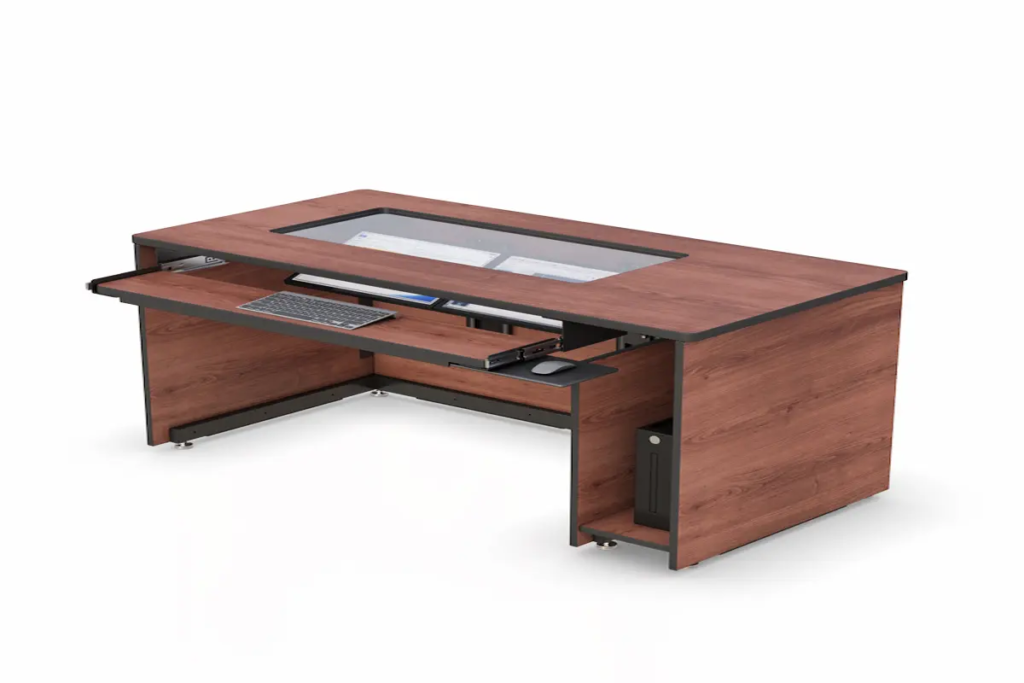
Custom Furniture Accessories: How to Build a Complete, High-Performance Workspace
|
⚡ Quick Summary • Custom furniture accessories — monitor arms, cable trays, keyboard trays, CPU holders, storage units, and integrated bundles — are what turn a standard desk or cart into a workstation that actually works. • Buying accessories as a system rather than one-off add-ons is the single biggest difference between a clean, high-functioning setup and an expensive, cluttered mess. • Six categories deliver the most measurable impact. Each one solves a specific problem — and knowing which problem you have first is what separates a smart purchase from wasted spend. • Before buying anything, run through six questions covering compatibility, adjustability, user fit, and durability. The table inside this guide walks through each one. • Browse AFC Industries’ full accessories range or use the product configurator to spec a complete setup. |
What Are Custom Furniture Accessories and Why Do They Matter?
Here’s a question worth sitting with: when a workspace stops working well, what’s usually to blame?
Most people point to the desk, the chair, the layout. But the more common culprit is the layer of stuff around those things — or more accurately, the absence of the right stuff. A monitor at the wrong height. Cables piled on a surface that should be clear. A keyboard sitting flat when it should be tilted. These aren’t furniture problems. They’re accessory problems.
The Human Factors and Ergonomics Society has noted that up to 60% of reported workplace discomfort traces back to poor workstation configuration rather than the primary furniture itself. That’s a striking number. It means the desk can be perfect and the chair can be perfect, but if the accessories aren’t right, people are still going to hurt at the end of the day.
Custom furniture accessories are modular add-ons — monitor arms, cable management systems, keyboard trays, CPU holders, storage trays, and integrated bundles — designed to close that gap. They sit between the furniture and the person using it. Get them right and everything else performs better. Get them wrong, or skip them entirely, and no amount of high-end primary furniture will save you.
This guide is specifically about accessories. If you’re looking at building a workspace from scratch using fully custom-spec’d furniture, our guide to custom products covers that process in detail. What we’re dealing with here is the precision layer that makes any workspace — custom or standard — actually perform.
What Accessories Actually Improve Your Workspace the Most?
Spend enough time in workspaces across industries and a pattern emerges. The setups that work best aren’t the most expensive ones. They’re the ones where someone clearly thought through what each person needs to do and then put the right tools at the right height, in the right place. The table below maps the six most impactful accessory categories to the specific problems they solve:
|
Accessory Type |
Problem It Solves |
Best Environment |
Value Impact |
|
Monitor Arms & Mounts |
Neck, shoulder & eye strain |
All screen-based workstations |
High — immediate posture fix |
|
Cable Management |
Clutter, hazards, cleaning delays |
Any multi-device setup |
Medium — safety & hygiene gain |
|
CPU Holders & Equip. Mounts |
Desk overcrowding, poor airflow |
Offices, IT stations |
Medium — space & airflow benefit |
|
Keyboard Trays & Wrist Rests |
RSI, wrist fatigue |
High-typing roles |
High — injury prevention |
|
Storage & Utility Trays |
Lost tools, compliance gaps |
Healthcare, industrial, lab |
Medium — time-saving |
|
Integrated Accessory Bundles |
Compatibility gaps |
Full workstation builds |
Very High — system coherence |
1. Monitor Arms and Mounting Systems
The single fastest win in any screen-based workspace. Most monitors ship with stands that put the screen too low, too close, or both. The result is predictable: forward head posture, shoulder tension, and eye fatigue that gets worse across the afternoon.
A decent monitor arm corrects all three. Height, depth, and tilt become adjustable in seconds rather than requiring a stack of books or a call to facilities. Cornell’s ergonomics research group puts the cervical spine load reduction at up to 45% compared to a fixed stand — which is a significant number when you consider how many hours a day most people spend looking at screens.
In multi-monitor setups, the difference between a fixed stand arrangement and a proper arm configuration is even more pronounced. Screens can be angled toward each other, positioned at matched heights, and swung out of the way when not in use. It’s one of the few accessories where almost everyone who buys one immediately wonders why they waited.
AFC Industries’ ergonomic mounts range covers single and dual-arm designs, VESA-compatible options, and track-mounted configurations for environments where the monitor needs to move between multiple positions throughout the day.
2. Cable Management Solutions
Nobody talks about cable management until something goes wrong — and then it’s all anyone talks about.
An unmanaged cable setup is a slow-motion problem. It starts with mild visual clutter and ends with someone tripping over a power cable, a cleaning crew unable to wipe down a surface properly, or an IT tech spending 20 minutes tracing which cable belongs to what before a simple swap. In healthcare environments specifically, tangled cables around workstations are a genuine infection control issue — they trap dust, make disinfection difficult, and can snag on equipment or clothing.
Good cable management isn’t complicated. It’s cable trays under the desk, a spine or sleeve along the monitor arm, and routing channels that keep power and data runs separate and identifiable. The materials matter too — what works in an office won’t hold up to the cleaning chemicals used in a clinical or industrial environment.
3. CPU Holders and Equipment Mounts
A CPU holder is one of those accessories that looks like a minor convenience right up until you’ve used a workspace without one. Towers and mini-PCs sitting on desk surfaces take up space that’s genuinely valuable, generate heat at face height, and sit at exactly the right elevation to collect kicked cables and accidental contact.
Under-desk or rail-mounted CPU holders solve all of that. Equipment sits below the work surface, airflow improves because the unit isn’t sandwiched between other objects, and the desk surface stays clear for actual work. In shared or shift-based environments, they also reduce the likelihood of accidental disconnections — something IT departments notice very quickly in the help desk ticket volume.
4. Keyboard Trays and Ergonomic Add-ons
The keyboard tray has an image problem. It feels like a 1990s office accessory, slightly dated, the kind of thing you’d find under a beige desk in a call centre. That perception is costing people their wrist health.
RSI from sustained keyboard use is genuinely prevalent and genuinely expensive. The UK Health and Safety Executive estimates it costs employers around £300 million a year in lost productivity and treatment — and that figure doesn’t capture the individual cost of chronic wrist pain for the people who develop it. A properly positioned keyboard tray puts wrists in a neutral position, keeps elbows at roughly 90 degrees, and removes the sustained static load from the forearms that accumulates over hours of typing.
The specification matters here. A cheap tray that wobbles, doesn’t adjust for tilt, or puts the keyboard at the wrong height for the user is worse than no tray at all. Get one with independent mouse platform adjustment, negative tilt capability, and a height range that actually covers the users at the station.
5. Storage and Utility Accessories
This category splits sharply by environment, and that’s worth being direct about.
In a corporate office, storage accessories are mostly about desk organisation — a monitor riser with a shelf, a cable-fed docking station tray, somewhere to put a notepad. Useful, but not critical. In a healthcare facility or laboratory, storage accessories are operational infrastructure. Labelled bays for frequently accessed supplies, lockable compartments for controlled items, surfaces that survive repeated disinfection without degrading — these aren’t nice-to-haves. They’re what stands between a well-run station and a compliance failure during an audit.
If you’re specifying storage accessories for a clinical or industrial environment, don’t buy office-grade products and expect them to hold up. The material spec, the locking mechanism, and the surface treatment all need to match the environment’s demands.
6. Integrated Accessory Systems (Bundles and Compatibility)
This is where the cumulative benefit of getting accessories right really shows up.
Buy a monitor arm from one supplier, a keyboard tray from another, a CPU holder from a third, and you’ll spend a surprising amount of time discovering they don’t quite fit together — different rail standards, conflicting bracket types, cable routing that doesn’t align. The result is a workstation that looks like it was assembled from spare parts, because it was.
An integrated accessory bundle, or a system where all components are specified from a compatible range, installs faster, looks cleaner, and is significantly easier to maintain or reconfigure. When something needs replacing, you’re ordering a known compatible part rather than hoping the new item fits the existing setup.
Pairing integrated accessory systems with computer carts and medical carts from AFC Industries removes the compatibility guesswork entirely. Everything is sourced from a system designed to work together.
How Do You Choose the Right Custom Furniture Accessories?
The most common accessory purchasing mistake isn’t buying the wrong thing — it’s buying the right thing for the wrong reason. A monitor arm that looks impressive but can’t hold the weight of your screens. A keyboard tray specified for right-hand use at a station where half the team is left-handed. Storage trays that look clean but can’t survive a bleach wipe-down.
The fix is straightforward: ask the right questions before the purchase, not after. The checklist below covers the six that matter most:
|
# |
Ask This Before You Buy |
Why It Matters |
|
1 |
Does it solve a real problem in my current setup — or does it just look good? |
Decorative accessories don’t justify the cost. Start with pain points. |
|
2 |
Is it compatible with the VESA standard, weight rating, or rail spec I already have? |
Mismatched specs are the number one cause of accessory returns. |
|
3 |
Can every user at this station actually reach and adjust it comfortably? |
One-size-fits-all rarely does. Check height ranges and dominant-hand needs. |
|
4 |
Will it still work if my workflow changes in 12 months? |
Adjustable beats fixed every time in dynamic environments. |
|
5 |
Does it work with the other accessories I’m planning to add? |
Buy the system, not the parts. Compatibility issues are expensive to fix later. |
|
6 |
Is the build quality matched to how hard this environment is on equipment? |
Office-grade accessories fail fast in clinical or industrial settings. |
How Do Accessories Work Together as a System?
Think about what actually happens when someone sits down at a workstation. They adjust the screen. They position their hands. They reach for something. They manage a cable that’s in the way. Every one of those moments is either smooth or it’s friction. Good accessory design eliminates the friction. Bad accessory design — or the absence of accessories — multiplies it across every working hour.
The system mindset means mapping those moments before specifying any component. What does the user touch first? What’s within arm’s reach? What’s in the way? Then build the accessory specification around those answers rather than starting from a product catalogue.
AFC Industries’ product configurator is built around exactly this process — it helps organisations map accessories to primary furniture and spot compatibility gaps before anything gets ordered. It’s faster than a spreadsheet and avoids the expensive surprises that come from ordering components that don’t fit together.
What’s the Real ROI on Workspace Accessories?
The ROI question deserves a straight answer, not a vague claim about “improved productivity.”
The Washington State Department of Labour and Industries tracked ergonomic workplace interventions across multiple industries and found an average return of $3.60 for every $1 invested — primarily through reductions in absenteeism, workers’ compensation claims, and the slower-to-quantify cost of people working uncomfortable and slowly rather than absent entirely. That’s a measurable figure, not a marketing estimate.
The equipment-longevity side of the ROI calculation is less cited but equally real. Monitors that are properly mounted last longer than ones that get knocked around on standard stands. CPUs mounted off the floor accumulate less dust and run cooler. Keyboard trays that keep equipment positioned correctly reduce accidental damage. The accessories that protect the primary equipment pay for themselves over time even before the ergonomic savings are counted.
How Much Do Custom Furniture Accessories Cost?
Pricing varies considerably depending on specification, environment grade, and whether you’re buying individual items or a bundled system. Here’s a realistic range based on current market rates:
- Monitor arms: $40–$300 per arm. The difference between the low and high end is mostly weight capacity, articulation range, and build quality for heavy-use environments.
- Cable management: $20–$150 for a complete under-desk routing setup. Clinical and industrial grades cost more because the materials need to survive cleaning agents.
- CPU holders: $30–$120. Adjustable models with rail mounting cost more but age better in dynamic environments.
- Keyboard trays: $50–$200 for properly specified ergonomic models with independent tilt and mouse platform adjustment.
- Storage accessories: $50–$400+ depending on lockability, material grade, and compliance specification. Healthcare and laboratory storage sits at the higher end.
- Integrated bundles: $300–$1,500+ for a fully specified multi-component system. Volume pricing applies for multi-station rollouts, often meaningfully reducing per-unit cost.
For organisations outfitting multiple stations, contact the AFC Industries team directly for a system quote. Pre-configured bundles at volume typically come in well below the sum of individual component pricing.
Where Do Custom Furniture Accessories Deliver the Most Value?
Real-World Use Cases Across Environments
The impact of accessories is easiest to see where their absence has already caused problems. These aren’t hypothetical scenarios — they’re patterns that come up repeatedly across the environments AFC Industries works in:
- Corporate offices and hot-desking: When multiple users share a single station across shifts, fixed accessories create a setup that works for nobody. Height-adjustable monitor arms and keyboard trays turn a shared station into one that any user can configure correctly in under a minute. The stations that don’t have them tend to be the ones people avoid booking.
- Healthcare nurse stations and point-of-care workstations: Infection control isn’t a secondary concern — it’s the primary one. Antimicrobial surface accessories, cable systems that allow full wipe-down access, and lockable storage for medication and documentation aren’t optional in these environments. The accessory specification has to match clinical standards, not office standards.
- IT operations and data centre management: Cable management and equipment mounting directly affect how long an incident response takes. A well-organised rack with labelled, routed cables can shave significant time off a fault diagnosis. A poorly managed one turns a 10-minute fix into an hour of tracing. That time has a real cost during an outage.
- Industrial assembly and quality control: Standard office accessories fail in manufacturing environments — usually within months. Sealed keyboard surfaces, monitor mounts rated for vibration, and heavy-duty tool storage rails are purpose-built for conditions where dust, impact, and chemical exposure are daily realities.
How Do Accessories Support a Workspace That Scales?
One thing that doesn’t get talked about enough is what happens when a workspace needs to change. New equipment gets added. Staff numbers shift. A team that was doing one kind of work starts doing another. Workspaces that were built with modular, rail-compatible accessories can adapt to those changes quickly. Ones that weren’t have to start over.
This is one reason why AFC Industries’ accessory range is designed to integrate directly with our track mount systems and industrial product range. Components slot into a common mounting system, so adding a new accessory doesn’t mean rebuilding the station. It means adding one part.
The Workspace That Functions vs. the One That Performs
There’s a version of a workspace that has all the right primary furniture — good desk, right chair, decent monitor — and still somehow feels like a fight. Cables everywhere, screen at the wrong height, nowhere obvious to put anything. People work in it, but they’re working around its problems rather than just working.
Then there’s the version where the accessories have been thought through. The screen is where it should be. The keyboard is at the right angle. The cables aren’t visible because they’re routed through a tray under the desk. Everything that needs to be in reach is in reach. That version doesn’t happen by accident. It happens because someone specified the right accessories for the right reasons.
That’s what this is about. Not the flashiest setup, not the most expensive one — the one that works the way it should from the first hour of the day to the last.
AFC Industries is a Pennsylvania-based specialist in ergonomic and industrial workspace accessories. Explore the full accessories range, build your system using the product configurator, browse the shop, or get in touch to talk through what your workspace actually needs. More about our work is on the About Us page.