
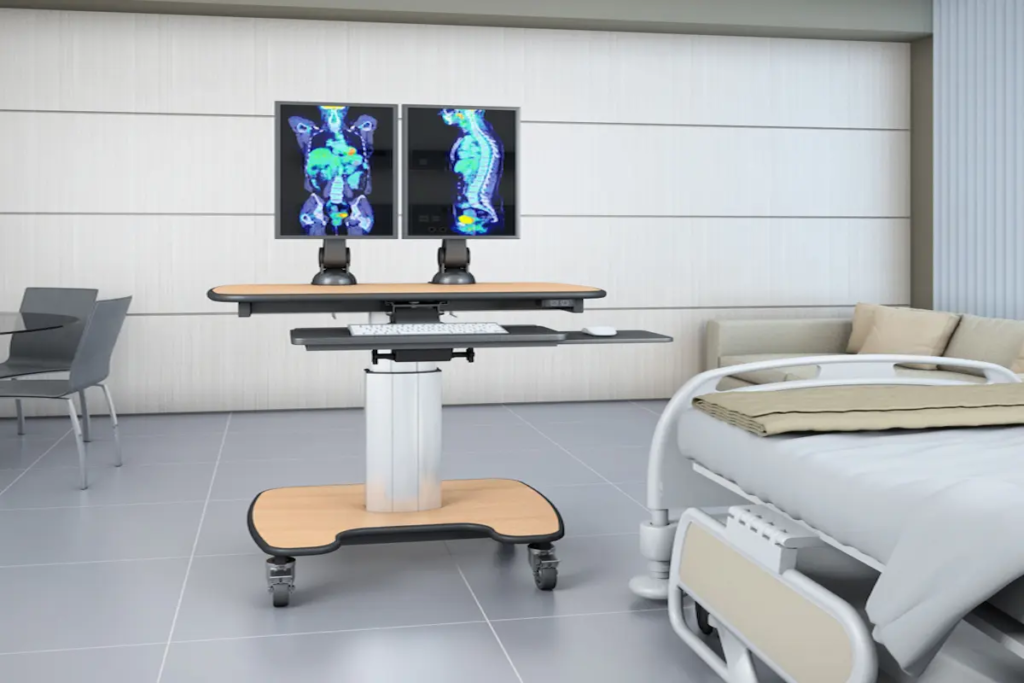
Mobile Tablet Carts and Monitor Stands on Wheels: When a Full Computer Cart Is Over-Specification
|
Quick Summary • Not every clinical mobile workstation needs to be a full computer cart. Many of the most common clinical mobility workflows — bedside rounding, patient education, allied health documentation, outpatient triage, community visits — are better served by a lighter, more compact tablet cart or monitor stand on wheels. • A mobile tablet cart carries a tablet or thin client to the bedside in a form that weighs under 12kg, fits through a standard doorway without manoeuvring, can be repositioned by a single clinician, and takes 30 seconds to set up rather than five minutes. • Monitor stands on wheels come in six configurations matching different clinical needs: tablet arm stand, single monitor stand, dual monitor rolling stand, large-format rolling stand, integrated tablet-plus-monitor, and lightweight portable fold-flat for community use. • The infection control case for tablet carts in clinical environments is simpler than for full computer carts: fewer surfaces, fewer crevices, and the option to individually sleeve or cover the tablet for the highest-risk environments. • AFC Industries PA supplies mobile tablet carts, monitor stands on wheels, and full clinical workstation configurations. Use the product configurator to spec a setup or contact the team to discuss your clinical workflow and device requirements. |
Why Do Healthcare Teams Need Mobile Tablet Carts — Not Just Full Computer Carts?
The medical computer cart is the dominant product in clinical mobile workstation procurement, and for high-documentation workflows it’s the right choice. But a significant portion of clinical mobility requirements don’t involve full documentation workloads. They involve a physician on rounds who needs to see a patient record and verify an ID. A nurse explaining discharge instructions at the bedside who needs to show the patient a printed-equivalent version on a screen. A physio documenting a session in a room where a 40kg cart physically cannot turn around.
For those workflows, a full computer cart is over-specification. It costs more, weighs more, takes more space, and takes longer to set up than the workflow requires. The right product is a mobile tablet cart or a monitor stand on wheels — a compact, lightweight display solution that brings the digital interface to the point of care without the infrastructure of a full workstation.
Research published in the Journal of Hospital Medicine found that physician ward rounding efficiency improved by 23% when patient record access was available at the bedside via a mobile device compared to returning to a fixed workstation between patients. The key word is ‘mobile device’ — not ‘full computer cart.’ A tablet on a lightweight stand at the bedside delivered the same information access benefit at a fraction of the weight, setup time, and cost.
This blog is the fifth in AFC Industries PA’s healthcare cart series. The previous four cover hygiene cart surface specification, rolling cart documentation efficiency, antimicrobial surface technology, and telemedicine cart configuration. This one addresses the workflows where those products are over-spec and a lighter solution is better.
AFC Industries PA is a Pennsylvania-based workspace solutions specialist, independent from AFC Industries.
When Should You Choose a Mobile Tablet Cart Instead of a Full Computer Cart?
The decision between a full computer cart and a tablet cart or monitor stand on wheels is a workflow question, not a budget question. Choosing a lighter option to save money on a workflow that needs full documentation capability produces a cart that’s inadequate for the job. Choosing a full computer cart for a workflow that only needs bedside record access produces a cart that’s impractical in the space and over-spec for the task.
The table below maps the key specification factors across both product types. The split is not about quality level — both can be built to high clinical standards. It’s about matching the product to the actual operational requirement.
|
Specification Factor |
Full Computer Cart |
Mobile Tablet Cart / Monitor Stand on Wheels |
|
Equipment payload |
Computer + full peripherals + storage |
Tablet or thin client + minimal accessories |
|
Workflow type |
Documentation-heavy; multiple systems open simultaneously |
Patient-facing; single-app or portal; rounding; education |
|
Weight |
15–40kg fully loaded |
4–12kg — one-person lift and reposition |
|
Footprint |
Wide base required for stability under load |
Compact — fits through standard doorways without manoeuvring |
|
Setup time |
5–10 minutes to connect and configure |
30–60 seconds to dock and unlock tablet |
|
Power requirement |
Significant — computer + monitors + battery |
Low — tablet battery plus small UPS or direct charge |
|
Best environment |
Nurse station, procedure room, ward documentation |
Bedside rounds, patient education, outpatient triage, home visits |
|
Infection control |
Full clinical surface spec with sealed cable management |
Simpler — fewer surfaces, fewer crevices; tablet can be wiped or individually sleeved |
The footprint and weight differences are the most frequently underestimated at the specification stage. A standard full medical computer cart has a base that is typically 60–80cm wide. A standard hospital doorway is 90–100cm. In a patient room with a bed, bedside cabinet, and monitoring equipment already in place, positioning a full cart at the bedside requires manoeuvring that takes time and creates disruption. A tablet arm stand that folds to 45cm wide and weighs 7kg is a completely different operation in the same space.
What Clinical Workflows Are Best Served by Mobile Tablet Carts?
Tablet carts and lightweight monitor stands on wheels are the correct specification for six clinical workflows that constitute a large proportion of clinical mobile workstation use across healthcare environments. The table below maps each workflow to the specific configuration it needs and explains why the lighter product is the right choice rather than a compromise.
|
Clinical Use Case |
Who Uses It |
Cart Configuration |
Why Tablet Cart, Not Full Computer Cart |
|
Bedside Ward Rounding |
Physicians, registrars, ward teams |
Compact cart with adjustable tablet arm; charging dock; barcode scanner; height-adjust for standing clinician at bedside |
A consultant reviewing six patients doesn’t need a full workstation at each bed — they need the patient record visible and a scanner to verify ID |
|
Patient Education |
Nurses, AHPs, discharge coordinators |
Tilting display arm at patient-visible angle; large-format tablet or 24–27” touch display; cable-free or wireless charging |
Showing a patient their discharge instructions or scan results on a screen they can see changes comprehension compared to verbal-only explanation |
|
Outpatient Triage |
Triage nurses, emergency intake coordinators |
Compact footprint; patient-facing tablet alongside clinician screen; height-adjust; fast between-patient wipe-down surface |
Triage involves taking patient-reported information at speed — a screen the patient can see and correct reduces input error and speeds the process |
|
Pharmacy Dispensing |
Pharmacists, dispensing technicians |
Barcode scanner integrated; medication record visible; second screen for cross-checking; sealed surfaces for medication preparation area |
Dispensing errors are reduced when the medication record and the physical medication are verified in the same visual field simultaneously |
|
Remote Monitoring Check-in |
Telehealth nurses, chronic disease teams |
Tablet cart with camera capability; patient-visible screen; quiet location with controlled background; portable enough for home visits |
Structured check-in visits with established patients need a lightweight, portable setup — not a full workstation that can’t get through a standard front door |
|
Therapy / Allied Health |
Physio, OT, SALT, dietetics |
Lightweight with narrow footprint; height-adjust for kneeling or seated documentation beside patient; quick-fold or wall-docking |
Therapy documentation often happens at unusual heights and in restricted spaces where a wide-base full cart is genuinely impractical |
How Are Portable Monitor Stands Being Used in Patient Education?
Patient education is one of the most consistently under-served use cases in clinical mobile workstation procurement. The equipment used for patient education at the bedside is almost always either a printed leaflet, a verbal explanation, or a clinician holding up a personal device because there’s no suitable mobile display solution in the room.
A portable monitor stand on wheels — or a tablet cart with a 24-inch touchscreen at patient-visible angle — changes how patient education works in practice. A nurse can show a patient the specific procedure they’re about to undergo using an animated explainer, with the screen angled so the patient can follow along rather than having to see it from the back of a turned-around monitor. Discharge instructions can be walked through on screen rather than handed to a patient who may not read them. Medication interactions can be shown visually. Consent discussions can reference the specific imaging or results being discussed.
Research published in BMJ Evidence-Based Medicine found that visual patient education using images and interactive tools improved patient comprehension of clinical information by up to 40% compared to verbal-only explanation. A portable monitor stand at the bedside is the hardware that makes that evidence actionable.
What Types of Monitor Stands on Wheels Are Available for Healthcare?
The product range for healthcare monitor stands on wheels is broader than most procurement teams realise, because most of the procurement conversation is dominated by full computer carts. The six stand types below cover the full range from a 7kg fold-flat tablet stand to a large-format touch display cart used for group patient education sessions.
|
Stand Type |
Display Size |
Primary Clinical Use |
Key Specification |
|
Tablet Arm Stand |
Tablet (7–13”) |
Bedside rounding, community nursing, AHP assessment |
Ultra-compact; tablet mounts on an adjustable arm; full cart weight under 8kg; folds flat for vehicle storage |
|
Single Monitor Stand on Wheels |
24–27” display |
Outpatient triage, patient education, portable consultation |
Mid-weight; height-adjustable pole; VESA mount; cable management channel; lockable casters; suits one-to-one clinical settings |
|
Dual Monitor Rolling Stand |
2x 24–27” displays |
Pharmacy dispensing, outpatient clinic documentation |
Wider base required; independent arm adjustment; heavier than single-screen equivalent; cable management for two screens |
|
Large-Format Rolling Stand |
32–50” touch display |
Patient education, group clinical education, outpatient waiting area |
High-load rated base; tilt mechanism for audience-facing angle; lockable wheels essential — heavier displays have significant tipping leverage |
|
Integrated Tablet + Monitor |
Tablet dock + secondary display |
Triage, intake, hybrid consultation environments |
Primary monitor at documentation height; tablet docked at patient-facing angle; two-in-one for consultations that need both perspectives |
|
Lightweight Portable Stand |
Tablet or small monitor |
Community, home visits, satellite clinics |
Maximum portability; under 6kg; folds for transport; battery-backed for off-grid clinical environments |
What Is the Difference Between a Mobile Tablet Cart and a Portable Monitor Stand on Wheels?
The distinction is about the device it carries and the clinical purpose it serves.
A mobile tablet cart is built around carrying and securing a tablet computer — typically 10–13 inches. The cart provides a stable, height-adjustable platform for the tablet, a charging dock, and often a second surface or small storage area for accessories. It’s designed for workflows where the tablet IS the computing device, not a secondary display.
A portable monitor stand on wheels carries a display — typically 22–50 inches — connected to a computing device elsewhere (a PC under the cart, a docked laptop, or a thin client). It’s designed for workflows where the display needs to be repositioned but the computing stays at a fixed or larger platform.
The integrated tablet-plus-monitor variant bridges these categories: the tablet docks into a stand that also includes a larger secondary display, giving a compact all-in-one that serves both consultation and documentation from the same cart.
AFC Industries PA’s computer carts range includes tablet cart configurations, monitor stands on wheels, and integrated setups. Use the product configurator to compare configurations.
How Do Infection Control Requirements Differ for Mobile Tablet Carts?
The infection control specification for a mobile tablet cart is simpler than for a full computer cart in most clinical environments — and that simplicity is one of the practical advantages of the lighter product category.
A full computer cart has a significant surface area, multiple cable entry points, keyboard mechanisms, and drawer runners that all require cleaning attention. A tablet cart has a much smaller surface map: the cart surface itself, the tablet arm, and the tablet. The cleaning burden per unit is lower, and the inspection challenge is smaller.
The tablet itself is the specific infection control variable that full computer carts don’t have. A tablet carried between patients in a clinical environment can accumulate surface contamination that a fixed keyboard wouldn’t. Three management approaches apply depending on the clinical environment:
- Single-patient dedicated tablet: The tablet stays with one patient throughout their admission. No cross-contamination risk between patients. Cleaned between admissions. Used in ICU and isolation environments.
- Antimicrobial wipeable case: The tablet operates in a case rated for IPA and quaternary ammonium wipe-down between patient interactions. Appropriate for general ward and outpatient environments where between-patient cleaning is standard practice.
- Hot-swap or hot-dock tablet: The cart carries a docking station. When the tablet needs to be cleaned or charged, a replacement slides in. Appropriate for high-throughput environments where documentation continuity matters more than carrying a single device.
For the full surface material and disinfectant compatibility specification for clinical cart surfaces, see the AFC Industries PA hygiene cart guide. For antimicrobial surface technology on cart components, see the antimicrobial cart guide.
How Do You Choose the Right Mobile Tablet Cart or Monitor Stand on Wheels?
The specification process starts with the same question that should open every clinical mobile workstation conversation: what specific clinical task is this cart supporting, and what does the person using it need to be able to do while they’re using it? For tablet carts and monitor stands, two additional questions are particularly important: how heavy can the cart be and still be safely moved by one person, and does it need to fold or pack for transport?
|
# |
Specification Question |
What It Determines |
|
1 |
What specific device will this cart carry — full computer, tablet, or display only? |
This determines base load rating, cable management complexity, power requirements, and whether a full medical cart or a tablet/monitor stand on wheels is the right product category. |
|
2 |
How physically large is the clinical space where this will operate? |
A wide-base full cart cannot manoeuvre through a 700mm doorway. A tablet arm stand can. Measure doorways and tight corridors before specifying base width. |
|
3 |
Will multiple staff members of different heights share this cart? |
For tablet carts on rounds, the height of the display changes as the same cart moves between a 6’2” consultant and a 5’2” nurse. The arm or height mechanism must accommodate the range, not just one person. |
|
4 |
Does the cart need to be moved by a single person, or will two staff always be present? |
A full computer cart at 35kg is a two-person move safely. A tablet arm stand at 7kg is a solo move. If lone-worker safety protocols apply, maximum weight is a specification constraint. |
|
5 |
What is the infection control requirement — and does the tablet itself need to be covered or docked? |
A tablet carried in a clinical environment can be a contamination source. Detachable antimicrobial tablet sleeves, hot-swap protected docking stations, and wipeable screen covers are the specification responses. |
|
6 |
Does this stand need to fold, pack, or transport for community or satellite clinic use? |
Carts used in community settings travel in vehicles. Folding mechanisms, maximum folded dimensions, and transport weight all become specification inputs that don’t apply to fixed-department hospital carts. |
How Do Mobile Tablet Carts Improve Healthcare Efficiency and ROI?
The efficiency gains from tablet carts are most visible in ward rounding workflows, where the Journal of Hospital Medicine research cited earlier showed a 23% improvement in rounding efficiency with bedside mobile device access. Extrapolated across a 30-bed ward with daily consultant rounds, that represents significant cumulative time recovered per week — time that can be redirected to additional patient interactions or reduced at the end of the working day.
The cost comparison also favours lighter solutions for appropriate workflows. A high-quality mobile tablet cart costs $800–2,500 versus $3,500–8,000 for a full clinical computer cart. For departments that have deployed full computer carts in workflows that only needed tablet-level capability, the over-procurement cost is significant and the operational friction from oversized carts in constrained spaces adds to it.
The community healthcare dimension is worth noting separately. Community nursing, district nursing, and home health services routinely need mobile clinical technology that travels in standard vehicles and operates in domestic environments. A 35kg full computer cart doesn’t do that. A 7kg fold-flat tablet cart does — and the cost, the weight, the portability, and the setup speed are all correct for that use case in ways that a full cart cannot be.
What Do Mobile Tablet Carts and Monitor Stands on Wheels Cost?
Pricing by product type and clinical specification:
- Tablet arm stand — ultra-lightweight, fold-flat, under 8kg: $300–$900. Suitable for ward rounding, allied health documentation, community visits, and patient education in any environment where portability matters more than load capacity.
- Single monitor stand on wheels (24–27” display, height-adjust, lockable casters, cable management): $500–$1,800 for the stand. Display cost additional. Suitable for outpatient triage, patient education, and portable consultation environments.
- Dual monitor rolling stand (independent arm adjustment, wider base, full cable management): $900–$3,000. Suitable for pharmacy dispensing, outpatient documentation with reference display, and any dual-screen workflow where a full cart is too large.
- Large-format rolling stand (32–50” touch display, high-load base, tilt mechanism): $600–$2,000 for the stand. Display cost additional. Suitable for group patient education, outpatient waiting area information, and large-screen consultation.
- Integrated tablet + secondary monitor stand (tablet dock + 24” secondary display, height-adjust): $1,200–$3,500. The most flexible configuration for combined documentation and patient-facing workflows without a full computer cart footprint.
- Lightweight portable fold-flat stand (community and home visit use, vehicle-storable): $400–$1,500 depending on load capacity and folding mechanism. Battery backup adds $200–$600.
For multi-unit procurement, volume pricing through AFC Industries PA reduces per-unit cost. For departments with a mix of workflow types, a tiered procurement approach — full computer carts for high-documentation stations, tablet carts for rounding and patient education, lightweight portable stands for community teams — optimises total cost against actual clinical need rather than applying a single specification uniformly.
Conclusion: Match the Cart Weight to the Clinical Task Weight
The most common specification mistake in clinical mobile workstation procurement is applying a full computer cart template to every mobile clinical need because it’s the most visible product in the category. Bedside rounding doesn’t need a full documentation workstation — it needs patient record access. Patient education doesn’t need a nurse station computer at the bedside — it needs a screen the patient can see. A community nurse visiting three patients in their homes doesn’t need a cart that weighs 35kg.
The correct specification starts from the clinical task, not the product category. If the task is documentation-heavy with multiple systems open simultaneously, a full computer cart is right. If the task is record access, patient interaction, or lightweight documentation in a constrained space, a tablet cart or monitor stand on wheels is right — and is better in ways that go beyond cost saving.
AFC Industries PA is a Pennsylvania-based workspace solutions specialist, independent from AFC Industries. This is the fifth guide in our healthcare cart series. See the hygiene cart guide, clinic rolling cart guide, antimicrobial cart guide, and telemedicine cart guide for related topics. Explore medical carts, computer carts, and custom builds. Use the product configurator, browse the full shop, or contact the team to discuss your workflow and device requirements. More about AFC Industries PA is on the About Us page.