
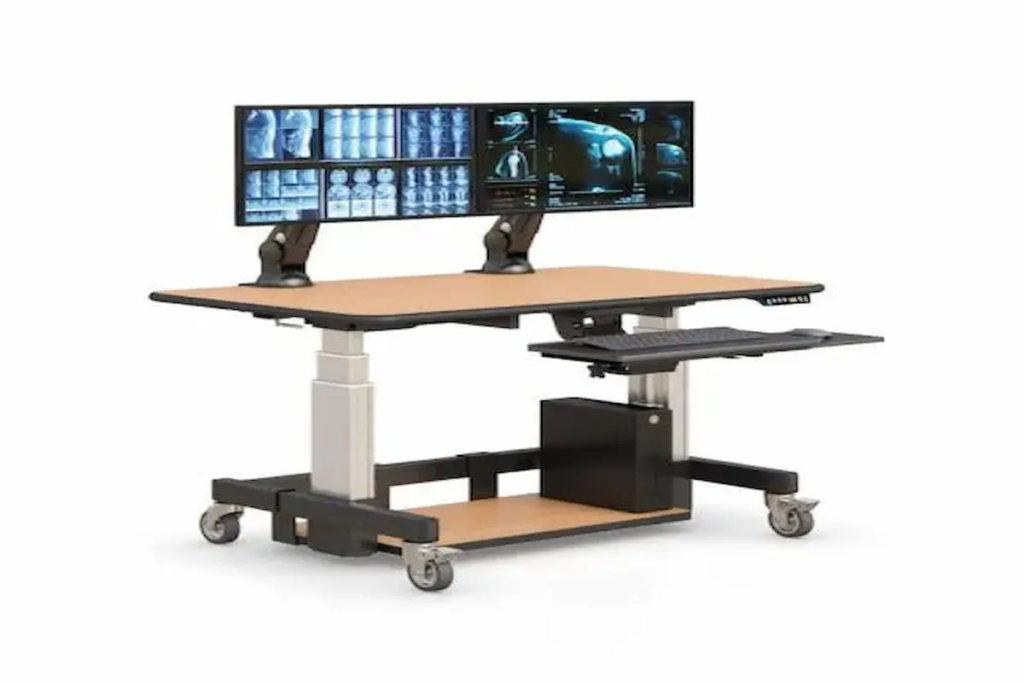
Sit-Stand Control Room Consoles: How to Improve Performance in 24/7 Operations
|
Quick Summary • Sit-stand control room consoles are purpose-built workstations for mission-critical environments where operators monitor systems, manage incidents, and make real-time decisions across shifts of eight hours or more. • The ergonomic case for sit-stand in control rooms is stronger than in standard offices. Operator fatigue in the final hours of a long shift directly affects decision accuracy and response time — metrics that matter operationally, not just physically. • Six features determine whether a console is genuinely built for 24/7 operations: electric height adjustment, multi-monitor mounting, cable management, heavy-duty construction, operator ergonomic design, and integrated system compatibility. • Different control room types — SOC, NOC, utility, traffic, emergency dispatch, broadcasting — have distinct specification requirements. A console optimised for one environment is not automatically right for another. • AFC Industries PA builds and supplies sit-stand control room consoles for Pennsylvania and Mid-Atlantic operations environments. Use the product configurator to spec a configuration, or contact the team to discuss your control room requirements. |
Why Are Sit-Stand Control Room Consoles Essential for Modern Operations?
The control room is one of the few environments where the performance consequences of workstation design are both immediate and measurable. An operator who misses an alert because visual fatigue reduced their contrast sensitivity in hour ten of a twelve-hour shift isn’t a human performance problem. It’s a workstation design problem.
Sustained static sitting is the dominant posture in most control rooms, and the research on what it does to cognitive performance over time is consistent. A 2012 study in the journal Ergonomics found that prolonged sitting without postural variation significantly increased perceived exertion and reduced monitoring accuracy in surveillance tasks. The decline began around the four-hour mark and accelerated after six hours. Sit-stand consoles interrupt that decline by allowing operators to change position before the fatigue accumulates enough to affect performance.
The Human Factors and Ergonomics Society publishes specific guidance on control room design that addresses operator workstation configuration as a safety and reliability factor — not just a comfort consideration. In industries where control room errors have operational or safety consequences, that framing matters for procurement justification as much as it does for operator welfare.
AFC Industries PA is a Pennsylvania-based workspace solutions specialist, independent from AFC Industries. We supply sit-stand control room consoles and integrated control room furniture to security operations centres, network operations centres, utility control facilities, and emergency dispatch environments across the Mid-Atlantic region.
What Features Make a Sit-Stand Control Room Console Effective?
There is a wide gap between a height-adjustable desk with wheels and a genuine sit-stand control room console. The difference shows up not in the specification sheet but in how the workstation performs after 5,000 hours of continuous use, during an incident when an operator needs to reconfigure quickly, or when a fourth operator uses the same console that was set up for the previous three. The table below maps the six features that define that gap.
|
Console Feature |
Problem It Solves |
Best Application |
Impact on Operations |
|
Electric Sit-Stand Adjustment |
Fatigue from fixed sitting posture |
All control room types, especially 8–12hr shifts |
Very High — posture variation is the primary fatigue countermeasure |
|
Multi-Monitor Mounting System |
Screen glare, neck rotation, visual fatigue |
SOC, NOC, traffic/utility control, dispatch |
Very High — screen position is the biggest source of MSK injury in this role |
|
Integrated Cable Management |
Clutter during incidents, snag hazards |
Any high-density technology workstation |
Medium-High — reduces distraction and maintenance time under pressure |
|
Heavy-Duty 24/7 Construction |
Component failure during critical ops |
Mission-critical, emergency, continuous ops |
High — rated for continuous use; failure tolerance is near zero |
|
Operator Ergonomic Design |
Reach strain, awkward postures at consoles |
All environments with sustained console use |
High — reduces cumulative injury risk across rotating shift staff |
|
Integrated System Compatibility |
Fragmentation between console and peripherals |
Full room builds with accessories + mounts |
Medium-High — cohesion across all components reduces friction and maintenance overhead |
1. Electric Sit-Stand Height Adjustment
The adjustment mechanism in a 24/7 control room console carries a fundamentally different use load than a mechanism in a standard office. A corporate desk might cycle five to ten times a day across a single user. A 24/7 console with four operators per day across three shifts cycles fifteen to twenty times daily, potentially for decades without replacement. The motor, the column, and the control panel all need to be rated for that duty cycle — not just for occasional adjustment.
The specification question isn’t just “does it go up and down.” It’s what is the rated lift cycles before maintenance is required, what is the payload capacity at maximum extension with the full monitor configuration mounted, and what happens if the mechanism fails mid-shift. Single-column mechanisms are cheaper and suitable for lighter configurations. Dual-column frames carry more weight, are more stable under load, and are the correct specification for multi-monitor control room setups.
2. Multi-Monitor Integration and Mounting
The number of screens in a control room console is rarely a fixed quantity over the life of the installation. SOC environments that started with three monitors per operator now routinely run five or six. NOC consoles that were designed for dual-screen infrastructure monitoring now add dedicated communication and ticketing displays. The mount system needs to accommodate that expansion without requiring the console to be replaced.
Screen position in control room environments has a more specific ergonomic requirement than in standard office settings. The primary monitoring screens — those an operator watches continuously — need to sit within 15 degrees of the central line of sight to avoid sustained neck rotation. Secondary screens used for reference or communication can sit at wider angles. Getting that geometry wrong at the time of installation creates a chronic neck rotation pattern that produces injury over a career, not just discomfort over a shift.
AFC Industries PA integrates ergonomic mount systems into control room console builds, with mount configurations specified for the actual screen count and primary/secondary monitor layout of the environment.
3. Cable Management and System Organisation
Cable management in a control room is a reliability issue before it’s an aesthetic one. A control room console with unmanaged cables is a console where the maintenance technician can’t quickly trace a specific cable during a fault, where the cable slack creates snag points during height adjustment, and where the visual complexity of the cable environment adds cognitive load during an incident when an operator needs to troubleshoot quickly.
The correct specification for control room cable management is not just “cable trays.” It’s a routed system where every cable has a defined path from source to device, where the path accommodates the full range of height adjustment without strain or binding, and where the identification of individual cables is possible by routing position rather than label reading. That last point matters most during incidents at 3am when the lighting is poor and the pressure is high.
4. Heavy-Duty Construction for 24/7 Use
A console in a 24/7 operation runs continuously. It doesn’t get switched off at the end of the day. It doesn’t get pushed back into a corner while cleaning happens. It operates at full mechanical load for the equivalent of three standard working years every calendar year. The specification for that use case is not the same as the specification for a sit-stand desk in an open-plan office that gets used eight hours a day and left alone for sixteen.
The construction dimensions that matter specifically for 24/7 environments: steel gauge on the frame (not aluminium, which fatigues faster under repeated mechanical cycling), welds rather than mechanical fasteners at structural joints, surface materials that withstand repeated cleaning rather than just initial installation, and caster specifications — or floor-mounting provisions — appropriate for the specific floor surface and any seismic or vibration requirements of the facility.
5. Operator-Centric Ergonomic Design
Control room ergonomics differs from standard office ergonomics in one critical respect: the operator isn’t doing a single task. They’re monitoring multiple feeds, typing documentation, communicating on multiple channels, and responding to events — often simultaneously, in a posture that changes between those tasks within seconds. The console needs to support all of those postures without requiring the operator to choose between comfortable monitoring and comfortable typing.
The specific design parameters that address this: surface depth that allows the keyboard to sit at the correct wrist position while the screens are at the correct distance (these are different measurements and a console that conflates them forces a compromise); storage access that doesn’t require turning away from screens; communication equipment placement that doesn’t obstruct the primary monitoring field; and lighting management that prevents screen reflectance from the ambient ceiling lights, which are usually the wrong colour temperature and brightness for a monitoring environment.
6. Integrated System Compatibility
A control room console is not the whole solution. It’s the centrepiece of a workstation ecosystem that includes mounting hardware, cable infrastructure, power distribution, environmental controls, and room management systems. A console that was specified in isolation from that ecosystem creates compatibility problems at every interface.
AFC Industries PA integrates consoles with track mount systems, workstation accessories, and custom product builds to create fully specified control room environments rather than isolated console installations. The product configurator maps compatibility across the full AFC Industries PA product range.
How Do You Choose the Right Sit-Stand Control Room Console?
The most common console specification mistake is starting with the product rather than the operation. A facilities manager visits a trade show, finds a console that looks right, and orders it based on height range and surface dimensions. Three months after installation, the operators have found four things it doesn’t do that the previous setup did, and two ways it creates problems the previous setup didn’t.
Six specification questions determine whether the console will perform as required over its full operational life:
|
# |
Specification Question |
Why the Answer Changes the Console Design |
|
1 |
What is the shift duration and how many operators will use this console per day? |
A solo 8-hour analyst station has different adjustment cycle requirements than a 24/7 console used by four operators across three rotating shifts. |
|
2 |
How many monitors are required, and at what relative height and angle? |
Monitor count and layout determine surface depth, mount type, and whether the adjustment mechanism can carry the full screen payload at all heights. |
|
3 |
What is the ambient lighting condition and screen brightness environment? |
High-ambient-light control rooms need matte anti-glare surfaces. Low-light environments need dark palette consoles that don’t generate visible reflectance. |
|
4 |
Does the console need to integrate with existing room infrastructure? |
Floor-mounted cable runs, raised access floors, existing power distribution systems, and room management software interfaces all affect the console specification. |
|
5 |
What is the surface depth requirement for documentation alongside monitoring? |
Operators who document while monitoring need surface depth that allows keyboard and mouse position independent of screen distance. Under-specifying this creates reach strain. |
|
6 |
Is there a requirement for classified, secure, or TEMPEST-rated construction? |
Government, defence, and intelligence control rooms have specific physical security requirements for workstation construction that commercial consoles don’t meet by default. |
How Do Sit-Stand Consoles Improve Performance and ROI?
The performance argument for sit-stand in control rooms is better supported by data than most buyers realise. A 2011 study in Applied Ergonomics measured response times and error rates in simulated monitoring tasks across four-hour seated sessions versus sessions with regular standing breaks. Operators who stood periodically showed 17% fewer monitoring errors in the final hour compared to those who remained seated throughout. In an environment where a missed alert triggers a response failure, that number has direct operational implications.
The ROI case has multiple components. The Washington State Department of Labour and Industries’ finding of $3.60 return per ergonomic dollar invested applies to control room environments through reductions in workers’ compensation claims for musculoskeletal disorders, which are among the most common occupational injuries in roles involving sustained static posture. There’s also an equipment investment component: a console rated for 24/7 use over a 15-year lifecycle costs less per operational hour than a lighter specification replaced every five years.
The less quantified but real return comes from retention. Control room operators are trained, cleared, and experienced assets. The environments that treat their physical conditions as a priority — rather than an afterthought — consistently report lower turnover in specialist roles where replacing an experienced operator is expensive.
Where Are Sit-Stand Control Room Consoles Most Valuable?
Control room environments share the common requirement for sustained monitoring, but the specific operational demands — and therefore the specific console requirements — vary significantly across sectors. The table below maps six of the most common environments to their primary operations, key specification needs, and the underlying reason the spec matters.
|
Environment |
Primary Operations |
Key Console Specification |
Why It Matters Here |
|
Security Ops (SOC) |
Real-time threat monitoring, camera feeds, incident response |
Low-glare surface, multi-monitor mounting, hot-desk adjustability for shift change |
Alert degradation in the final hours of a 12hr shift is the primary human risk factor |
|
Network Ops (NOC) |
Infrastructure monitoring, fault isolation, change management |
Cable-dense setup, sit-stand for long diagnosis sessions, anti-glare monitor position |
A fatigued NOC engineer misreads an alert hierarchy — the console spec directly affects that risk |
|
Utility Control |
Grid monitoring, SCADA system oversight, incident response |
24/7 rated construction, redundant power to monitors, heavy-duty base for permanence |
Uptime tolerance is near zero; the console must outlast its operators’ career span |
|
Traffic Management |
Live camera monitoring, signal control, incident coordination |
Wide surface for documentation + screens, height adjust for multi-operator shifts |
Shift handover without console reconfiguration loses continuity; adjustable consoles solve this |
|
Emergency Dispatch |
High-stress, high-accuracy coordination, multi-channel comms |
Ergonomic reach zones, low surface profile, unobstructed sight lines to screens |
Physical comfort under stress is a performance variable, not a comfort one |
|
Broadcasting / Production |
Live production monitoring, multi-feed management |
Precise monitor positioning, clean cable management, custom surface depth |
Production errors cost airtime; the console spec contributes to the cognitive load the operator carries |
How Do Sit-Stand Consoles Support 24/7 Rotating Shift Operations?
The rotating shift introduces a dimension that single-user office sit-stand desks don’t face: every operator who sits down at the console may have different height requirements, different monitor angle preferences, and a different time remaining in their shift before fatigue becomes a factor. The console needs to accommodate all of those transitions quickly, reliably, and without requiring the incoming operator to spend the first ten minutes of their shift adjusting equipment.
The specification consequence is practical. Electric adjustment with pre-set memory positions — each operator saves their preferred height profile — eliminates the friction of manual reconfiguration at shift change. Some environments where precise handover protocols matter programme those presets into room management or access control systems, so the console automatically adjusts when an operator logs in. That’s not a luxury feature in a 24/7 environment; it’s a productivity and safety mechanism.
AFC Industries PA’s control room console builds support programmable height memory and integrate with custom product specifications for facilities that need room management or access-linked adjustment programming.
What Does a Sit-Stand Control Room Console Cost?
Control room console pricing varies significantly based on surface size, screen payload, adjustment mechanism specification, and whether the build is standard, configured, or fully custom. Realistic benchmarks for professional-grade 24/7 rated consoles:
- Entry-level sit-stand console (single operator, 2–3 monitors, standard depth): $1,500–$3,500. Suitable for light-duty control applications with moderate adjustment cycle requirements.
- Mid-range professional console (2–4 monitors, dual-column mechanism, integrated cable management): $3,500–$7,000. The appropriate specification range for most SOC, NOC, and utility control applications.
- Heavy-duty 24/7 console (4–6 monitors, commercial-grade mechanism, full cable management, custom depth): $7,000–$15,000+. Required for mission-critical environments with high adjustment cycle loads and maximum-payload screen configurations.
- Full control room build (multiple console positions, room integration, accessories, custom specification): Project-specific. AFC Industries PA scopes full control room builds from requirements through installation. Contact the team for a project estimate.
The cost comparison that matters for procurement justification is not console price versus standard desk price. It’s console total cost of ownership over the operational life of the installation — factoring in adjustment mechanism maintenance, surface replacement, and the cost of operator injury claims that a properly specified console prevents. Professional-grade 24/7 consoles consistently win that comparison against lighter-specification alternatives that require earlier replacement or generate ongoing maintenance costs.
Conclusion: The Control Room Console Is a Performance Tool, Not a Piece of Furniture
The frame that most control room managers use when specifying consoles — “what desk do we need” — is the wrong starting point. The right question is what workstation configuration keeps operators performing at their required accuracy level across the full duration of every shift, for the operational lifetime of the installation, with a rotating population of users who may have different physical requirements.
Sit-stand capability is part of that answer because the evidence on posture variation and sustained monitoring performance is clear. The other parts of the answer — screen position, cable discipline, surface depth, construction rating, system integration — matter equally. A console that adjusts height but positions the screens at the wrong angle for the operator’s eye line hasn’t solved the performance problem. It’s moved it.
AFC Industries PA is a Pennsylvania-based workspace solutions specialist, independent from AFC Industries. We design and supply sit-stand control room consoles and integrated control room environments for SOC, NOC, utility, emergency dispatch, and broadcasting operations across Pennsylvania and the Mid-Atlantic region. Explore our industrial products range, custom builds, and ergonomic mounts, use the product configurator to start a specification, browse the full shop, or contact the team to discuss your control room requirements. More about AFC Industries PA is on the About Us page.